 how-to
How to Book a Dental Appointment Online
Table of Contents
- Why Book Your Dental Appointment Online
- What Information You'll Need Before Booking
- Using the Dental Appointment Request Form
- What to Say When Booking a Dentist Appointment
- How to Reschedule a Dentist Appointment
- What to Expect at Your First Dental Appointment
- Common Mistakes to Avoid When Booking Online
- Confirmation and What Happens Next
- Frequently Asked Questions
Last Updated: October 5, 2026
Why Book Your Dental Appointment Online
When you book a dental appointment online, you save time and remove friction from the process. You can schedule at any hour, without waiting on hold or playing phone tag with reception staff. Most practices now offer this option because it works better for everyone involved.
You fill out your information once, the practice has it ready, and your first visit runs smoothly.
Online booking also means you can compare availability and pick the slot that actually works for your schedule. No more compromising on timing because it's the only slot the receptionist mentioned. You see all options upfront.
The process typically takes under five minutes. You'll need basic information ready, answer a few health questions, and confirm your booking. We'll cover exactly what information to gather in the next section.
What Information You'll Need Before Booking
Gather these details before you start the online booking process. Having everything ready means you won't get stuck mid-form.
Personal details:
- Full name
- Date of birth
- Phone number
- Email address
- Current address
Health information:
- Any existing medical conditions
- Current medications you're taking
- Allergies (especially to medications)
- Whether you're a new patient or returning patient
- Your preferred dentist (if applicable)
Insurance details (if you have coverage):
- Insurance provider name
- Member ID number
- Group number (if applicable)
Reason for visit:
- General check-up
- Specific concern or pain
- Cosmetic treatment inquiry
- Emergency appointment
If you're insured with Medibank, Bupa, or HCF, have your policy details handy. Williamstown Family Dental Group is a preferred provider for these funds, which can simplify your booking and coverage process.
Don't worry if you're missing a piece of information. Most online forms let you skip optional fields and come back to them later. But the more details you provide upfront, the faster your first appointment will run.
Using the Dental Appointment Request Form
The online appointment request form is straightforward. Most practices use similar layouts, so once you've done it once, the process becomes automatic.
Start by selecting your appointment type. Choose whether you need a general check-up, a specific treatment, or an emergency slot. If you're unsure what category your concern falls into, pick "general check-up", the practice will contact you if they need more detail.
Next, choose your preferred date and time. The system shows available slots in real time. You'll see which dentists have openings and what times suit your schedule. Pick the option that works best for you.
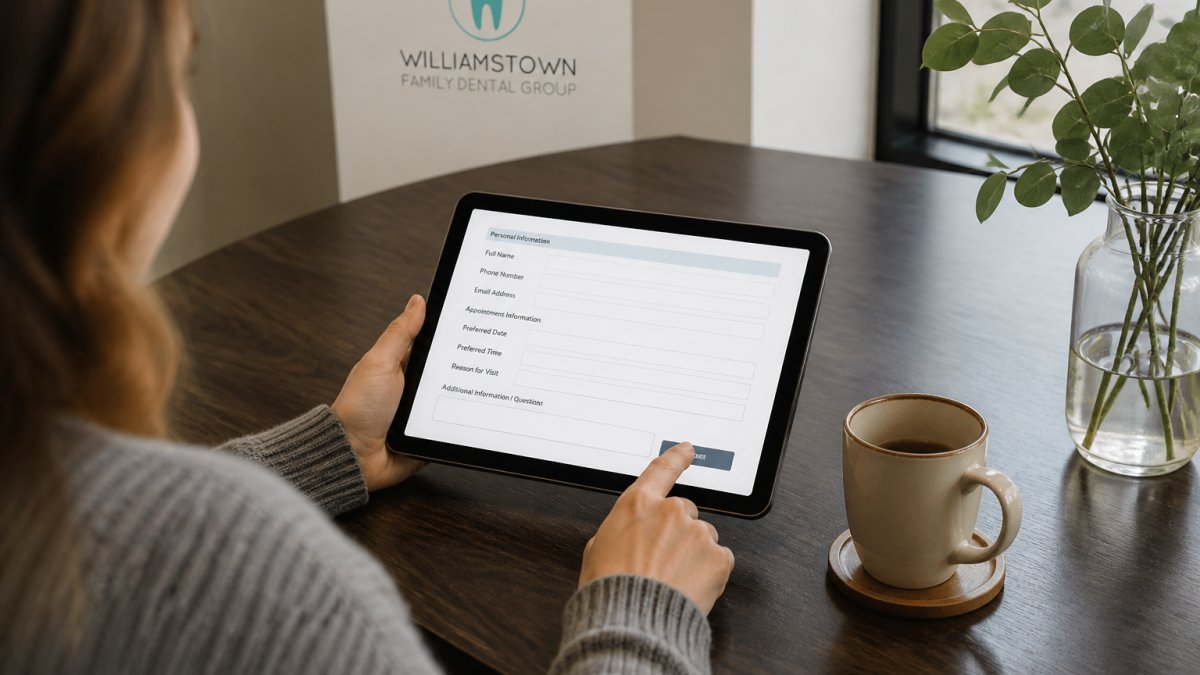
Then fill in your contact information. Use the email and phone number where the practice can reach you most easily. Double-check these before submitting, typos here mean missed appointment reminders.
Add your health history. Be honest about medications, allergies, and existing conditions. This information helps your dentist prepare for your visit and avoid complications.
If you have insurance, enter your provider and member ID. The practice will verify coverage before your appointment, so you know exactly what to expect cost-wise.
Review everything before you submit. Most forms have a confirmation screen where you can check your details. Catch any errors here rather than discovering them at reception.
Hit submit. You'll get an immediate confirmation on screen, and the practice will send a confirmation email within a few hours. Save this email, it contains your appointment details and any pre-visit instructions.
What to Say When Booking a Dentist Appointment
When you book a dental appointment online, knowing what information to communicate makes the process smoother. Whether you're booking online or calling, the practice needs to understand why you're coming in.
If it's a routine check-up, say that clearly. "I'd like to schedule a general check-up and clean." This tells the practice how much time to block and which dentist to assign.
If you have a specific concern, describe it briefly. "I have sensitivity in my lower left teeth" or "I'd like to discuss whitening options" gives the practice context. They can prepare for your visit and ensure the right equipment is available.
For returning patients, mention if you've had work done since your last visit. "I had a filling done six months ago and I'm having some discomfort with it" helps the dentist review your history before you arrive.
If you're anxious about dental visits, say so. Many practices have experience working with nervous patients. Mentioning this upfront means the team can take extra time and explain each step as they go.
For families booking multiple appointments, be clear about who needs what. "I need a check-up, my partner needs a check-up, and my child needs their first appointment" helps the practice schedule efficiently and possibly block adjacent time slots.
If you have insurance, mention it during booking. This speeds up the verification process and means fewer surprises on the day.
How to Reschedule a Dentist Appointment
Life happens. You might need to move your appointment for work, illness, or unexpected events. Most practices make rescheduling straightforward.
Check your confirmation email first. It usually contains a link to manage your booking or a phone number to call. Many practices let you reschedule directly through their online portal without speaking to anyone.
If you're rescheduling through the portal, select your original appointment and choose a new date and time from available slots. The system updates instantly, and you'll get a new confirmation email.
If you need to call, do it as soon as you know you can't make it. This gives the practice time to offer your slot to another patient. Most practices ask for at least 24 hours' notice for routine appointments.
When you reschedule, the practice keeps your health history and preferences on file. You won't need to fill out the form again, just confirm your new time.
If you're rescheduling because of an emergency or genuine hardship, many practices are flexible.
For recurring appointments (like six-monthly check-ups), ask if the practice can block your preferred time slot going forward. Some practices reserve regular slots for established patients, which means less back-and-forth scheduling each time.
What to Expect at Your First Dental Appointment
Your first visit sets the tone for your ongoing care. Knowing what happens reduces anxiety and helps you prepare mentally.
You'll arrive 10-15 minutes early. Bring your insurance card and a form of ID. The reception team will check you in and confirm your contact details match what you entered online.
The dentist will review your health history with you. This is the time to mention any concerns you didn't capture in the online form. Be honest about your oral hygiene habits, any pain you've experienced, and your goals for your teeth.
A hygienist will likely do an initial assessment. They'll check your gum health, take X-rays if needed, and do a professional clean. This is painless and helps the dentist see what's happening beneath the surface.
The dentist will then examine your teeth and gums. They'll explain what they find in plain language, no jargon. If they spot issues, they'll discuss options with you rather than recommending treatment on the spot.
For new patients, this first appointment is partly about building a relationship.
At the end, you'll discuss next steps. This might be scheduling a follow-up, planning treatment, or simply booking your next routine check-up. You'll also get information about aftercare if you've had any procedures.
Common Mistakes to Avoid When Booking Online
Small errors during booking can create friction later. Here's what to watch out for.
Don't rush through the form. Taking two extra minutes to check your phone number and email prevents the practice calling the wrong number or your confirmation ending up in spam.
Don't skip health questions. Even if a question seems unrelated to your teeth, answer it honestly. Dentists need this information to keep you safe during treatment.
Don't book the wrong appointment type. If you need emergency care, don't book a routine appointment. Contact the practice directly and explain the urgency. They'll fit you in faster.
Don't ignore pre-visit instructions. If the practice asks you to avoid food before your appointment or bring specific documents, do it. These instructions exist for a reason.
Don't assume your insurance covers everything. Have your policy details handy so you can ask questions during booking. Williamstown Family Dental Group can advise on what your coverage includes, but knowing your policy helps.
Don't book at an inconvenient time just to get it done. If the only available slot is at 7 a.m. and you're not a morning person, wait for a better option. You're more likely to miss an appointment that doesn't suit your schedule.
Don't forget to save your confirmation details. Screenshot your confirmation email or write down your appointment time and location. Losing this information means calling the practice to confirm.
Confirmation and What Happens Next
After you submit your online booking, you'll receive immediate confirmation on screen. This tells you the appointment is registered in the system.
Within a few hours, you'll get a confirmation email. This email contains your appointment date, time, location, and dentist's name. It also includes any pre-visit instructions specific to your appointment type.
Some practices send reminder notifications. You might get an SMS or email 24 hours before your appointment. These reminders reduce no-shows and give you a final chance to reschedule if needed.
Check your spam folder if you don't see the confirmation email within a few hours. Sometimes automated emails get filtered incorrectly. Add the practice's email address to your contacts so future messages go to your inbox.
If you don't receive a confirmation within 24 hours, contact the practice. This could mean the booking didn't go through, or there was a technical issue.
Before your appointment date, review what the practice asked you to bring or prepare. If you need to complete additional paperwork, do it beforehand. This keeps your appointment on schedule.
On the day of your appointment, arrive 10 minutes early. This gives you time to find parking, settle in, and feel calm before you're called through.
After your appointment, the practice will likely schedule your next visit. For routine check-ups, this is usually six months away. If you need follow-up treatment, you might book before you leave.
Booking a dental appointment online is one of the easiest ways to take control of your oral health. When you have the right information and understand the process, you're set up for a smooth first visit.
Frequently Asked Questions
What information do I need to book a dentist appointment?
Have your full name, date of birth, contact number, email address, and current health insurance details ready. If you're a new patient, prepare a brief description of any dental concerns or previous treatments. For children's appointments, have a parent or guardian's details available. If you're taking a health fund rebate, your membership number will speed up the process.
How do I reschedule a dentist appointment if I can't make my booking?
Contact the practice as soon as possible, ideally at least 24 hours before your appointment. Most practices allow rescheduling through their online booking system, by phone, or via email. Provide your appointment details and suggest alternative times that suit your schedule. Giving advance notice helps the practice accommodate other patients and avoids potential cancellation fees.
What should I expect at my first dental appointment?
Your first visit typically includes a full examination, discussion of your dental history, and a professional clean if needed. The dentist will assess your oral health, take X-rays if necessary, and discuss any treatment options. Allow extra time for paperwork and health fund verification.
Will I receive confirmation after requesting an appointment online?
Yes, most practices send confirmation via email or SMS shortly after you submit your booking request. Check your spam folder if you don't see it within a few minutes. The confirmation includes your appointment date, time, dentist's name, and instructions on what to bring. If you don't receive confirmation within a few hours, contact the practice directly to confirm your booking is registered.